
Many of us use AI tools as a diary, business assistant or brainstorming buddy, often typing in very personal details without a second thought. But if you’ve ever hit “send” and immediately wondered, “Wait… should I have said that?” this guide is for you. When it comes to AI privacy and data security, the most important thing to remember is that these are tools connected to servers, account permissions, and stored data.
This is originally a podcast episode. Listen here.
Privacy online is about whether it’s stored, used for training or accidentally shared, not just who can see your text.

So here are a few privacy checks you can do on your preferred AI chatbot. I am focusing today’s post on ChatGPT, Claude and Gemini. If you’re using anything else, just check for similar settings, and you’re good to go!
Privacy Check #1: Master Your Settings for AI Privacy and Data Security
The easiest way to upgrade your AI privacy and data security is to check your history and training toggles. If you care about privacy but haven’t touched your settings, that is your first red flag. Many people never check whether their chats are being used to improve the model. If they are, that means they are not private. But there’s a setting that controls that. If the toggle is off, your chats won’t be used to improve the model.
-
ChatGPT: Go to Settings > Data Controls and toggle off “Chat History & Training” (or “Improve the model for everyone”) to ensure new chats aren’t saved or used to improve the model.
-
Gemini: Your activity is tied to your Google account, so make sure to check your Google account settings. You can turn off activity tracking or set an auto-delete period (e.g., 3 or 18 months) in your Gemini Apps Activity settings.
-
Claude: While generally more privacy-focused by default, chats are still stored temporarily for safety reviews, so maintain the same awareness as with other tools.
Privacy Check #2: Use Temporary or Incognito Modes
Not every conversation needs to live forever in your history. If a chat would make you uncomfortable to reread six months from now, use a temporary mode. It’s especially useful for awkward questions, emotional processing, personal situations, sensitive planning and anything else you may not want sitting there later.
A few examples I would use the temporary chat feature for: relationship situations, drafting a job resignation, personal money concerns, health-related questions or legal scenarios you want to think through.
-
ChatGPT: Use Temporary Chat (think of it as incognito mode) for sensitive planning or emotional processing.
-
Gemini: Look for the dotted conversation cloud symbol next to the new chat button.
-
Claude: Use the little ghost symbol in the upper right-hand corner to enter incognito mode.
If your preferred chatbot doesn’t have a clean ‘incognito mode’ button, the closest equivalent is turning off activity tracking or manually deleting chats. I believe they mostly do have something like that now though.
Privacy Check #3: Stop Feeding AI Sensitive Information
The biggest mistake in AI privacy and data security is oversharing. You don’t need to give your chatbot your full life story for it to be helpful. Instead of pasting passwords, addresses, or confidential work documents, learn to anonymize your prompts.
-
Instead of: “My employee Mark from XYZ Ltd…”.
Say: “One of my team members…”
-
Instead of: Pasting a full medical diagnosis or legal contract.
Say: “Here is the structure of the issue without the personal identifiers”.
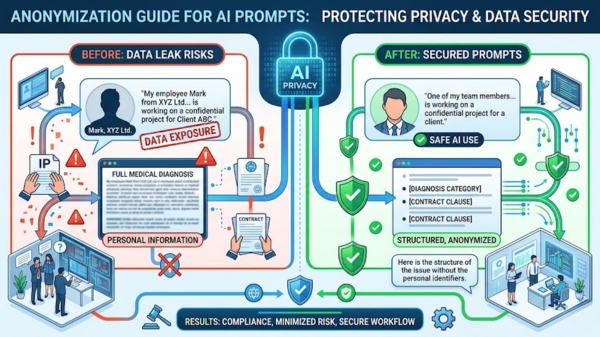
ChatGPT does not need your full life story to help you think. This rule doesn’t change depending on the tool. If it’s sensitive, don’t type it in.
Privacy Check #4: Audit Your Shared Links
A common but “sloppy” privacy risk is forgetting about shared chat links. If you’ve ever clicked “Share,” that URL may still be active even if you’ve forgotten about it.
In ChatGPT, navigate to Settings > Data Controls > Shared Links to delete any old URLs.
In Gemini, check “Your public links” under Settings. However, Gemini is a bit more complicated, because sharing exists via the entire Google ecosystem (Docs, Sheets, links, etc.). So, the risk isn’t just the shared chat, but also copying outputs into your shared Google Docs or even accidentally sharing files.
In Claude, review “Shared Chats” in your Privacy settings.
Remember: simply deleting the chat from your main history isn’t enough; you must invalidate the shared link itself.
Privacy Check #5: Account-Level Security for AI Privacy and Data Security
Sometimes the risk isn’t the AI, but your own device security. According to a March 2026 cybersecurity report by SentinelOne, human error and misconfigurations account for 95% of data leaks, making local settings like 2FA your most critical defense. Use strong passwords, enable Two-Factor Authentication (2FA), and avoid staying logged in on public or shared devices. Also, be very careful of auto-save on your browser, as well as third-party tools that connect to your AI tool.
As Luiza Jarovsky, CEO of AI Tech & Privacy Academy, notes: ‘In 2026, privacy is no longer just a compliance layer; it is a competitive advantage for users who know how to control their data flow.’
For Gemini users, your AI privacy is entirely dependent on your Google account security. So, make sure your Google account is airtight.

Basically, a private chat isn’t very private if all it takes for someone to see it is open your laptop.
All the tips in this section apply to all the tools. They are equal for all of them, just make sure to be extra careful with Gemini, as it’s usually connected to a lot more than just your chatbot.
Conclusion: AI Privacy and Data Security
The goal isn’t to stop using AI. It is to use it smarter. Excellent AI privacy and data security comes down to three things: what you share, what you store, and what you forget to delete. Treat your AI like a tool, not a vault, and you’ll already be ahead of most users.
Generally,
Claude: generally more privacy-focused by default, but doesn’t mean you can treat it like nothing can happen
ChatGPT: most features, but you need to adjust settings
Gemini: deeply tied to your Google account, so be very careful
No tool is 100% private by default. Some just require less effort than others. If you don’t use any of these tools, but something entirely different, you can still apply the same tips, and it probably has a lot of the same or at least similar features.
Ready to secure your workflow? Check out my Full Tools Library for more recommendations on the best AI apps, or sign up for my newsletter to grab a free prompt guide!
FAQ: Mastering AI Privacy and Data Security
How do I stop AI from training on my personal data?
To stop AI training, you must manually opt-out in your chatbot’s settings. In ChatGPT, toggle off “Chat History & Training” under Data Controls. For Gemini, manage your “Gemini Apps Activity,” and for Claude, ensure “Model Improvement” is disabled. This ensures your inputs remain private and are not used to update the global model.
What is the difference between a temporary chat and a normal chat?
A temporary chat (or incognito mode) is an ephemeral session that does not save to your history or contribute to the AI’s long-term memory. Unlike normal chats, these sessions are wiped once the window is closed, making them ideal for handling sensitive information or “one-off” questions you don’t want stored on a server.
Is it safe to share work documents with an AI?
It is only safe to share work documents if you use an Enterprise-grade AI account or strictly anonymize the data first. Public versions of AI tools can store and potentially learn from your uploads. Always remove names, trade secrets, and proprietary code before pasting information into a standard chatbot interface.